Replacement holders
Paper filing supplies
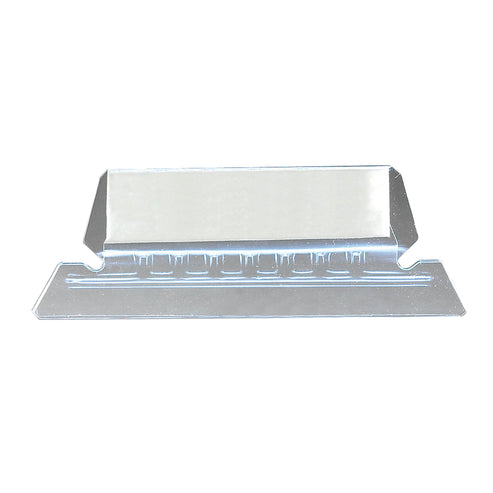
Smead 64600 Clear 1/5-Cut Hanging File Folder Tabs, 25/Pack
These clear 1/5-cut holders let you compare several tab positions on compatible folders.
Check current price
Check current price (paid link) ↗
Choose a tab position, fit the paper insert, and test the labels from your usual filing position before printing a whole drawer.
Follow these steps at your own pace. Check product terms and prices directly with providers before purchasing.
Fit one clear holder and one dark-on-light paper insert to a real folder. Put the folder halfway back in the drawer, open it the distance you normally use, and read it from your normal standing or seated position. Choose the tab edge and arrangement from that test before making the whole set.
Removable plastic tabs have feet that fit slots along a hanging folder. A built-in tab on a reinforced folder works differently. Inspect the top edge before buying replacements. If your folder has a built-in writing area, use a suitably sized label on that area. If it has slots, check the replacement holder against an actual folder. Its feet should seat without stretching or tearing the slots.
A size such as “1/5-cut” describes a tab position system. It does not give you the printable area inside every brand of holder. The clear Smead 64600 holder and the white 68620 insert below illustrate why the measurements differ. The outer holder has material around the visible paper. Trace a supplied insert or measure the inside opening before setting a print template.
Put a sample tab on the front edge of one folder and another on the back edge of a second. Add a few sheets and stand where you usually file. Try opening the folder by its tabbed edge. Select the arrangement that shows the text and lets your hand open the correct pocket. Apply it consistently in that drawer so a tab reliably identifies the papers in front of or behind it.
Turn “Client account documents for North Hall” into “North Hall / Account.” Compare three adjacent names. If all three start with the same client and are filed under a parent tab, put the project word first on the inner folders. Leave room around the type. A long phrase squeezed into tiny lettering defeats the purpose of printing a label.
Use dark text on plain paper and compare it against the original insert. On a perforated sheet, print a test on ordinary paper first and hold it against the sheet to check alignment. Follow the sheet maker’s feed orientation. If a printer scales the page to fit, the first label can line up even as later rows drift. Check the first and last positions before using the real stock.
Slip the paper fully into the sleeve, with the lettering facing the viewing side. Ease both feet into compatible slots, gently flexing only as the holder permits. If you use a label maker, stick the tape to the replaceable paper insert. Compare Brother PT-H110 tape widths if you already own that machine. Leave the ends of the insert bare enough to slide through the sleeve.
| Drawer use | Arrangement to test |
|---|---|
| Lookup by alphabet | Start with one vertical line of tabs so the eye can scan down the names. |
| Five named subjects often used together | Try staggered positions to expose neighboring headings. |
| A drawer with thick and thin sections | Use one line for main headings and subordinate labels on the inner folders. |
| Shared drawer with color-coded work | Keep text on every tab so the color is an extra clue. |
To compare layouts, put five temporary labels in each arrangement in turn. Ask another person to find two named folders and to return a third. Watch what they grab. If they consistently reach one pocket too far back, correct the tab-edge convention. If they must bend down to distinguish the names, shorten the wording, enlarge the type, or move the drawer’s most-used section forward.
A tab that catches the cabinet roof needs a lower compatible holder or a different filing orientation. Measure the available clearance with the drawer partway closed. A sleeve that looks blank under a lamp may simply be reflecting glare. Change the viewing angle or position and test again. A label that disappears only when the drawer is packed needs more room between folders.
Keep a few blank inserts together in the drawer. When a range such as “M–R” becomes too crowded, divide the alphabetical range using real client names, replace the inserts, and retain the holders. Check the last new label from the usual reading position before making the change permanent.
These clear 1/5-cut holders let you compare several tab positions on compatible folders. The white 1/5-cut inserts give dark lettering contrast and slide out when a folder changes purpose.
These clear 1/5-cut holders let you compare several tab positions on compatible folders.
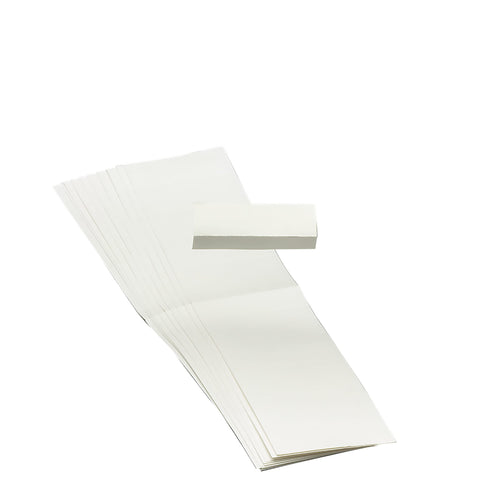
The white 1/5-cut inserts give dark lettering contrast and slide out when a folder changes purpose.
Prices may change. Check the retailer for the current price and availability. We may earn a commission from qualifying purchases at no additional cost to you. Learn more.
Comments
Comments are reviewed before they become public.
Sign in with Google to leave a comment.
Sign in with GoogleNo approved comments yet. Be the first to start the discussion.